
CFD with AI: The Design Exploration Problem — Why Running More Simulations Isn’t Always the Answer
TL;DR: Design space exploration is one of the hardest practical problems in computational fluid dynamics (CFD) work—too many geometric parameters, not enough time to simulate every combination.
Siemens has built a suite of AI tools into the Simcenter platform that claims to address this directly. This series is our honest engineering evaluation of whether those tools deliver what Siemens says they will.
The Tools: What They Are and What They Can and Can't Do
To understand how AI transforms CFD workflows, we first need to look at the foundational components within the Siemens Simcenter ecosystem:
STAR-CCM+: The Physics-Based CFD Solver
What it does: The physics-based CFD solver at the center of this workflow. Uses the finite volume method to solve the Navier-Stokes equations from first principles. Handles meshing, solving, and post-processing in a single integrated environment. Acts as the source of simulation data that all downstream AI tools are trained on—the quality of surrogate models is directly tied to the quality of STAR-CCM+ results.
What it can't do: Replace engineering judgment in setup, boundary condition selection, or results interpretation.
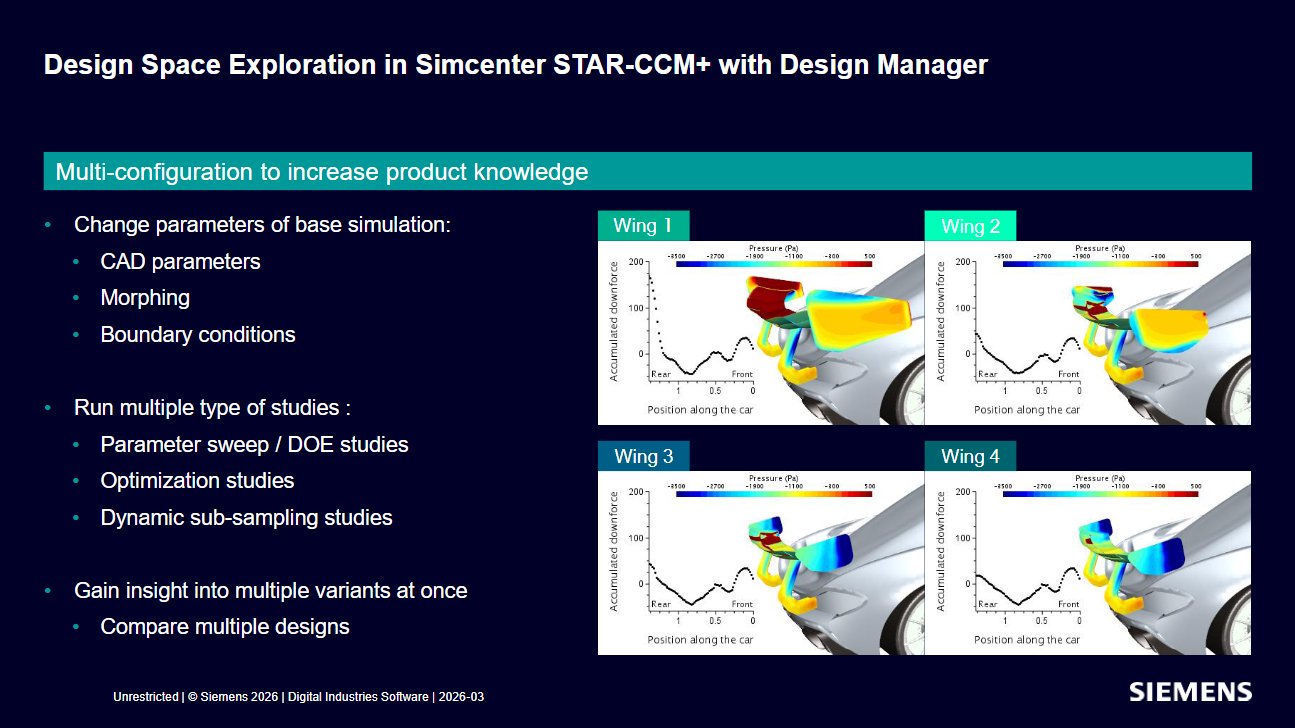
Design Manager: Parametric Studies Built into STAR-CCM+
What it does: Manages parametric study setup directly inside STAR-CCM+ with no separate install required. Supports structured Design of Experiments (DOE) methods including Latin hypercube sampling and full factorial designs. Handles file organization and run management for large parameter sweeps automatically.
What it can't do: Decide which parameters matter or what ranges are physically meaningful—that still requires human engineering input.
HEEDS: Design Space Optimization with SHERPA
What it does: A separate Siemens product that sits outside STAR-CCM+ and acts as the optimization navigator across the design space. Uses an adaptive algorithm called SHERPA that blends multiple search strategies simultaneously rather than committing to just one method. It is solver-agnostic and can connect to STAR-CCM+ or other simulation tools.
What it can't do: Guarantee finding a global optimum; performance depends on the quality and coverage of the training simulations.
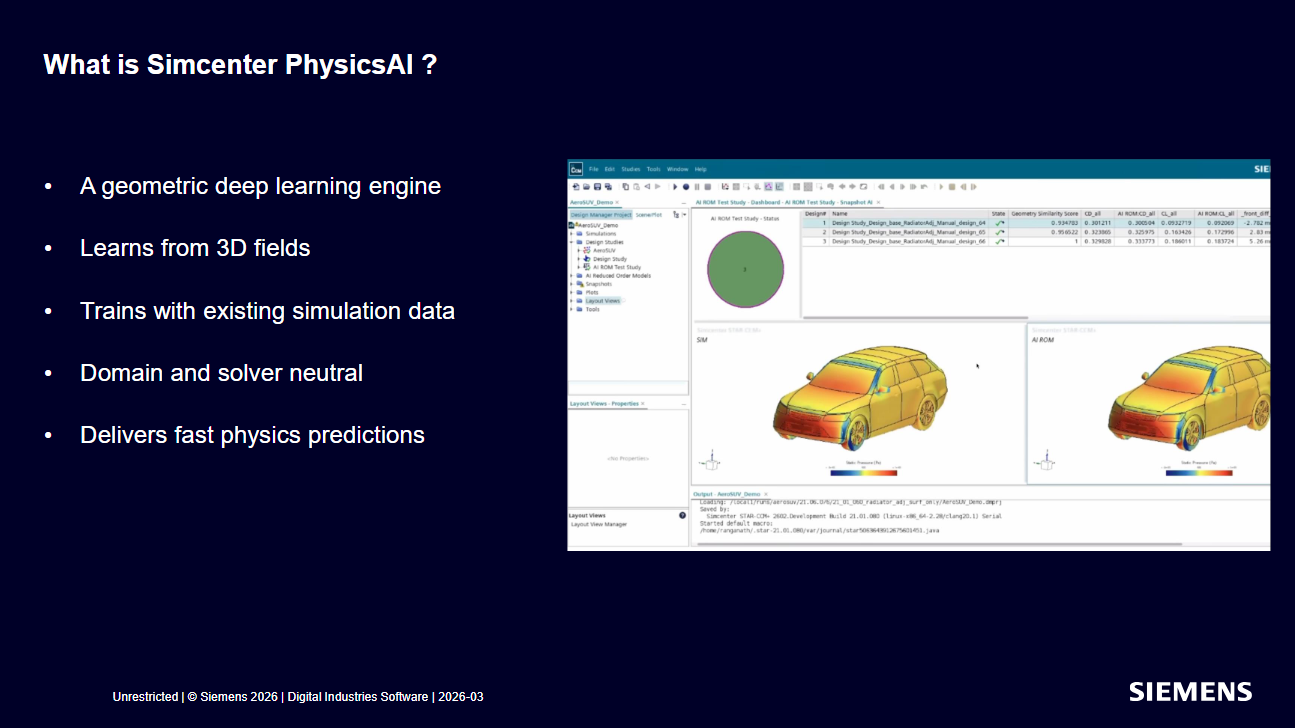
PhysicsAI: Geometric Deep Learning for STAR-CCM+ (Launched Mid-2026)
What it does: A STAR-CCM+ add-on that works directly on mesh geometry using geometric deep learning, rather than operating on scalar parameter values like traditional surrogate models. Requires a dataset of prior simulation results to train on before it can make predictions (Siemens suggests a minimum of ~10 representative results, though complex problems may need significantly more). It is GPU-accelerated, with Siemens claiming predictions run up to 100x faster on GPU than CPU, and includes a built-in similarity metric to flag when a new geometry is too different from training data to trust.
What it can't do: Replace a full-fidelity solver for final validation. Accuracy depends heavily on training data quality and geometric diversity, and we are continually validating these claims against real project results.
The Gap Between Good and Optimal
It’s Wednesday afternoon and an aerodynamics engineer is staring at a drag coefficient that won’t budge. The ground vehicle they have been working on for the past month has a drag coefficient of 0.34. This is acceptable, but not competitive. The program target is 0.29.
They have already run sixteen simulations, each taking a few hours overnight on the team’s workstation, modifying the rear diffuser angle, the A-pillar, and the underbody panels.
Each change has moved the number incrementally in one direction or the other. But they are just a couple of weeks from design freeze, and the problem is clear: there are at least ten geometric parameters they haven’t fully explored (such as the roofline trailing edge, rear fascia curvature, and front splitter), and most of them interact with each other in ways that aren’t obvious from individual runs.
Changing the front splitter affects the underbody pressure, which affects the diffuser, which affects the wake. Unless a lucky set of geometric parameters is tested, running them one at a time will not find a drag coefficient of 0.29.
An engineer with genuine expertise and a well-built simulation—but not enough time to run every combination—is exactly where artificial intelligence (AI) enters the CFD workflow. AI does not strictly replace the physics-based solver or the engineer’s judgment, as human verification is always needed. But by applying it correctly to the prototype and design pipeline, the engineer can dramatically expand the number of design variants evaluated before the deadline.
About This Series
This post is the first in a series covering the AI tools now built into the Siemens Simcenter suite. Specifically, we cover STAR-CCM+, Design Manager, HEEDS, and PhysicsAI, integrated with Simcenter STAR-CCM+ version 2602.
We use STAR-CCM+ daily in our CFD work, but the AI tooling covered here—particularly PhysicsAI—is new as of mid-2026. We approach it the same way we approach any new capability: with interest, and with the exact same engineering skepticism we apply to our own simulation results. This series documents what Siemens claims these tools can do, how the underlying methods work, and whether the results hold up in practice.
One Simulation Is Never Enough
Here is the challenge that every engineer working with CFD eventually runs into: there are more design variants worth evaluating than there is time to simulate them. Every parameter you can adjust—whether it is a geometric dimension, a material property, or an operating condition—adds another layer of combinations to consider.
The question is not just whether your current design is good. It is whether the best possible design is somewhere in that space that you haven’t had the time to reach. Running simulations one at a time, or even in small batches, is rarely enough to answer that question with confidence.
The Combinatorial Explosion Problem
Consider a relatively simple example: you are optimizing the geometry of a heat exchanger baffle.
Parameters: Height, width, spacing, angle, and thickness (5 parameters).
Resolution: 5 values for each parameter.
Total Combinations: 5⁵ = 3,125 unique design variants.
If each simulation takes an hour on your hardware—including analysis to verify the results make sense—that is over four months of continuous computing time and analysis for just one component.
In practice, engineers deal with this by running far fewer simulations than the problem warrants. This leads to:
Compromised judgment calls about which variants to test
Accepting suboptimal designs because the truly optimal one was never simulated
Carrying uncertainty about how robust designs are across full operating envelopes
This is a rational response to resource constraints, not a failure of engineering judgment. But it means many CFD-driven design processes are leaving critical performance on the table.
Your Design Space Is a Map You Haven’t Drawn Yet
A useful way to think about design space exploration is to imagine a map. When you begin a design study, you know your parameters and the range of values each one can take. You know the boundaries of the territory. But you have no idea what the terrain inside those boundaries looks like.
Which regions produce good performance? Where are the peaks and valleys? Where does the design behave unexpectedly?
At the start of any design study, you are an explorer holding a blank map with only its edges drawn in. The terrain is rarely simple. If each parameter affected performance independently, you could map it efficiently by varying one parameter at a time. However, real-world physics are interconnected.
More Hardware Only Goes So Far
The instinctive response is to throw more compute power at the problem—more CPU cores, faster hardware, and simulations running in parallel. These things help, and having adequate computing resources is a real prerequisite for serious CFD work. But even with a fast cluster, many teams still face the same fundamental bottleneck: the number of combinations worth exploring far exceeds what any reasonable compute budget can cover.
The Shift From Running More to Learning More
What if, instead of running more simulations, you could get more information out of the simulations you already have?
This is the conceptual shift that AI brings to CFD-driven design. Rather than using each simulation as a one-time answer to a specific question, an engineer can create a model that treats simulation results as a dataset. Each result helps the model learn the relationship between design parameters and performance outputs.
Going back to our map analogy: instead of trying to walk every inch of the territory, you run a carefully chosen set of simulations to place markers at strategic locations across the design space. The model then uses those markers to draw the map, filling in the terrain between your simulation points and building a complete picture of performance changes across the full range of your parameters.
This filled-in map is called a surrogate model. Once you have it, you can query it almost instantly instead of waiting hours for a new simulation to converge.
How the Workflow Operates
First Principles Grounding: The surrogate model is not a replacement for the physics-based solver; it is an approximation built from the solver’s results. The solver itself computes fluid behavior from the fundamental equations governing mass, momentum, and energy.
Targeted Search: AI helps decide where to run simulations next. Rather than distributing runs randomly or relying solely on intuition, the model identifies which regions are most likely to contain the optimal design and directs the study there.
What This Looks Like in Practice
The workflow leverages multiple integrated tools in tandem:
STAR-CCM+ generates the baseline physics-based simulation results.
Design Manager handles setup and organization of parametric design studies.
HEEDS acts as the intelligent navigator, deciding which simulations to run next.
PhysicsAI goes a step further by working directly with geometry, using deep learning to predict performance from shape rather than scalar parameter values alone.
If your team is spending more time waiting for simulations than acting on their results, that is exactly the problem this series is designed to help you solve.
At Resolved Analytics, we work with these tools every day and help clients maximize their simulation investments. If you think your workflow could move faster, reach out to us and an engineer will be in touch.