
Keeping the Cloud Cool: Data Center Cooling, Sustainability, and the Role of CFD
Every photo you back up, video you stream, and question you ask an AI ends up in a data center somewhere. Data centers consume a lot of energy, which is used to process and safely store data in the cloud.
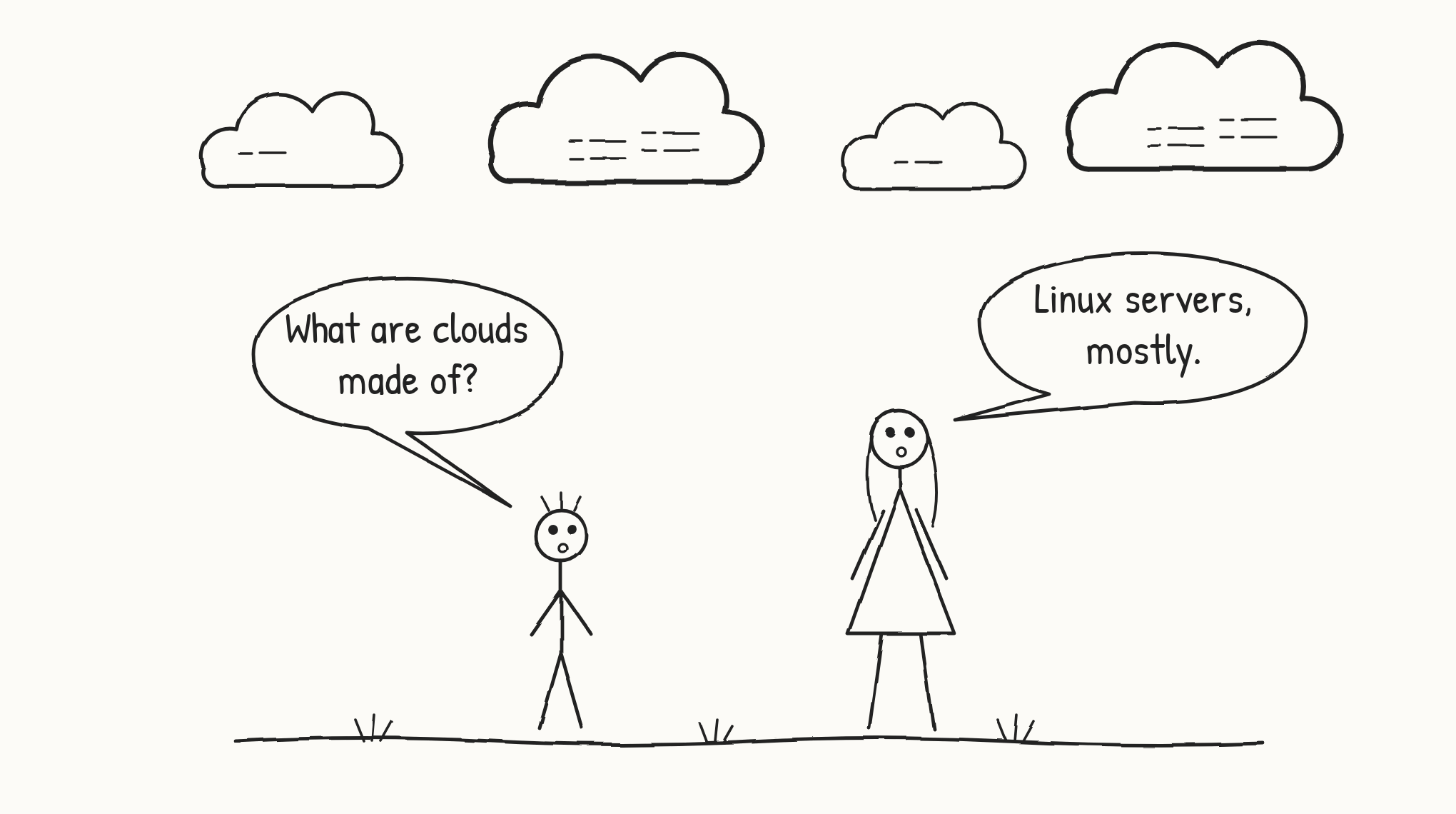
The cloud is a lot less fluffy than it sounds.
The servers heat up while handling that data, so to prevent malfunction, we must keep them cool.
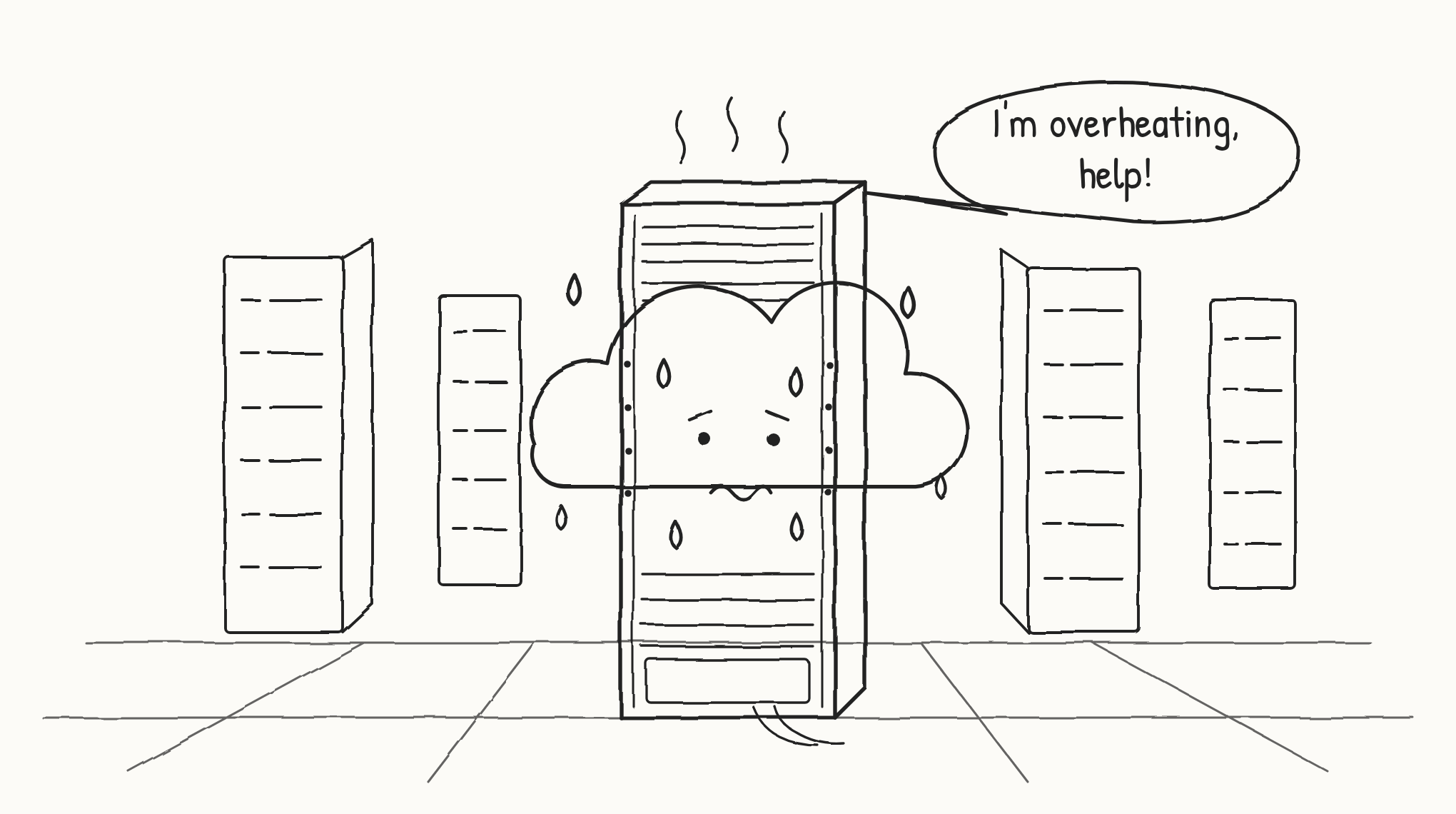
Servers generate heat as they process data, and without cooling they can overheat and fail.
Cooling is the largest energy load in a data center after the IT equipment itself, and depending on the method, it can consume significant amounts of water too. AI is raising the stakes: today's GPU racks can produce several times more heat than the servers most data centers were originally designed for. Every cooling approach involves trade-offs between energy, water, refrigerants, and reliability, and the right balance depends on climate, density, and site.
This article walks through the main ways data centers are cooled, looks at the sustainability challenges of each, and explains where computational fluid dynamics (CFD) fits in. CFD uses computer simulation to predict how air and liquids move and carry heat, so engineers can see airflow, temperatures, and hot spots before anything is built or changed.
Most data centers today are cooled with air, using mechanical refrigeration (CRACs, or CRAHs supplied by chillers), often supplemented by economizers or evaporative cooling that take advantage of outside air or water when the weather allows. Liquid cooling is growing quickly for AI loads, which are pushing air cooling to its physical limits and changing its role rather than eliminating it. AI is not making air cooling obsolete; rather, it is forcing a hybrid cooling architecture.
Air Cooling Using Computer Room Air Conditioning (CRAC)
CRACs keep the air temperature and humidity constant. Large fans move the cold air to the IT equipment, and smaller local fans inside the servers cool the chips. A CRAC works like a refrigerator for the room: it pulls in warm air exhausted by the servers, passes it over a cold coil where a refrigerant absorbs that heat, and sends the cooled air back out to the IT equipment. The heat picked up by the refrigerant doesn't disappear. It's pumped through a refrigeration cycle to a condenser, usually located outdoors on the roof or beside the building. "Rejecting heat into the ambient" means that condenser releases the heat into the outside air (the ambient environment), completing the loop so the data center interior stays at a steady temperature and humidity.
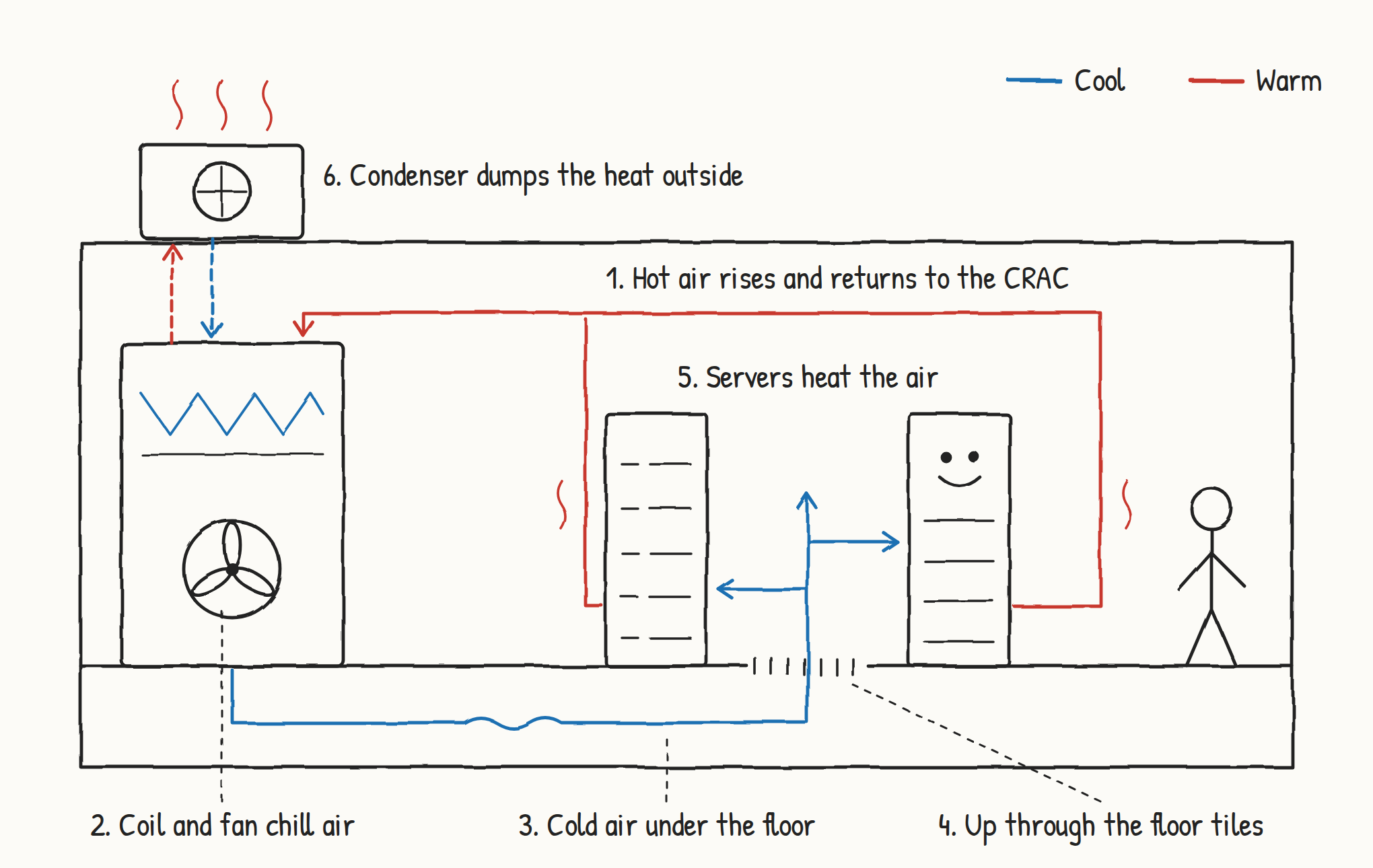
A CRAC unit cools the room by circulating air through a refrigeration coil and rejecting the heat outdoors through a condenser.
The Sustainability of CRACs
CRACs rely on compressors, the same technology inside a refrigerator, and those compressors are one of the biggest energy users in a data center after the servers themselves. They're also a major reason for a poor Power Usage Effectiveness (PUE), the standard measure of how efficiently a data center uses energy. They work hardest in hot climates and when units run inefficiently. CRACs also use chemical refrigerants, many of which are powerful greenhouse gases when they leak. New regulations in the U.S. and Europe are phasing these refrigerants out, but some of the replacements are flammable or less efficient. On top of that, operators often overcool the room to make up for hot spots, which wastes even more energy.
Direct Evaporative Cooling
Direct evaporative cooling is another way to cool a data center. Outside air is drawn into the data center and passed through a wetted media pad, where some of the water evaporates and absorbs heat from the airstream, lowering the air's dry-bulb temperature while raising its humidity. Because the cooling comes from the latent heat of vaporization rather than mechanical refrigeration, the process uses far less energy than compressor-based systems, which is why it's often called "free cooling." Its effectiveness depends heavily on climate: it works best in hot, dry regions where the gap between the dry-bulb and wet-bulb temperature is large, and it needs careful control of humidity, filtration, and water treatment to protect IT equipment.
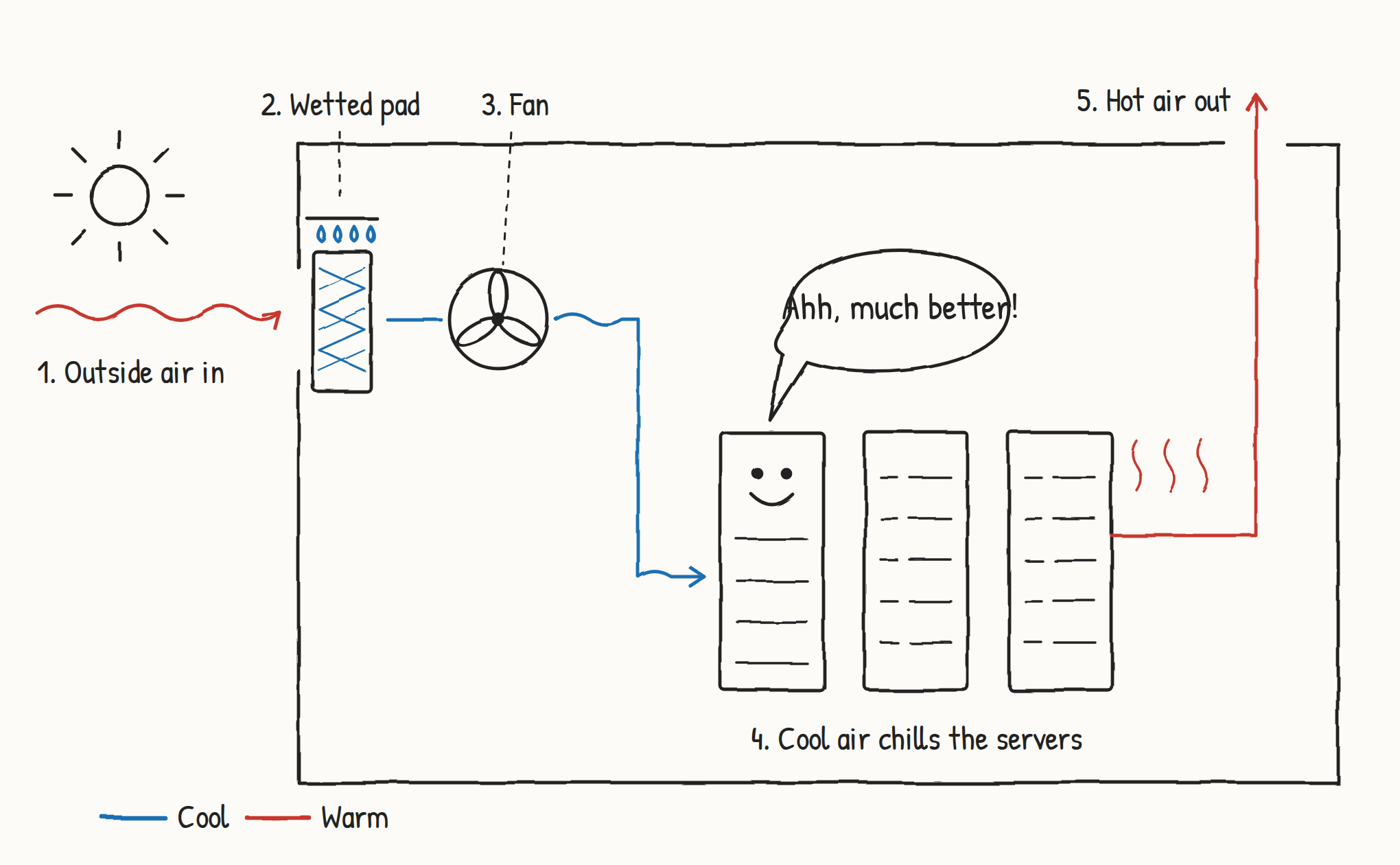
Direct evaporative cooling uses water evaporating from a wetted pad to cool outside air before it reaches the servers.
The Sustainability of Direct Evaporative Cooling
Direct evaporative cooling uses far less electricity, but it consumes significant water, measured as WUE (Water Usage Effectiveness). The catch is that it works best in hot, dry climates, which are often the same regions facing water scarcity, so facilities can end up competing with communities and agriculture for a stressed resource. There are also secondary concerns: chemical treatment and blowdown water discharge, the risk of Legionella and other microbial growth in wetted media, and the moisture, particulates, and contaminants that outside air brings into the white space. Facilities also need backup mechanical cooling on humid days when evaporation stops working well, which partially erodes the energy savings.
In practice, operators manage these trade-offs with hybrid or indirect evaporative systems (which keep outside air and moisture separate from the IT space), higher allowable supply temperatures per ASHRAE guidelines, reclaimed or non-potable water sources, and controls that switch modes based on weather. The best design depends heavily on local climate, water availability, and grid carbon intensity. Site-level airflow also matters: hot exhaust recirculating back into the intakes of condensers or evaporative units reduces efficiency for either approach, which is where exterior CFD analysis earns its keep.
Liquid Cooling
Water and other liquids have played a role in data center cooling for decades; chilled water plants and cooling towers are liquid systems, after all. What makes a system truly "liquid cooled" is where the liquid first meets the heat. If the coolant pulls heat directly off the IT equipment, it's liquid cooling. If air picks up the heat first, the system is still air cooled, even when liquid sits just inches away. A rear-door heat exchanger is a good example: water flows through a coil mounted on the back of the rack, but the servers' fans still push hot exhaust air across that coil. The air's trip is very short, yet air is doing the first step of heat removal, so the system is classified as air cooled. A facility is called liquid cooled when its main IT load is liquid cooled, even though air never fully goes away. Strictly speaking, though, nearly every real liquid-cooled data center today is a hybrid.
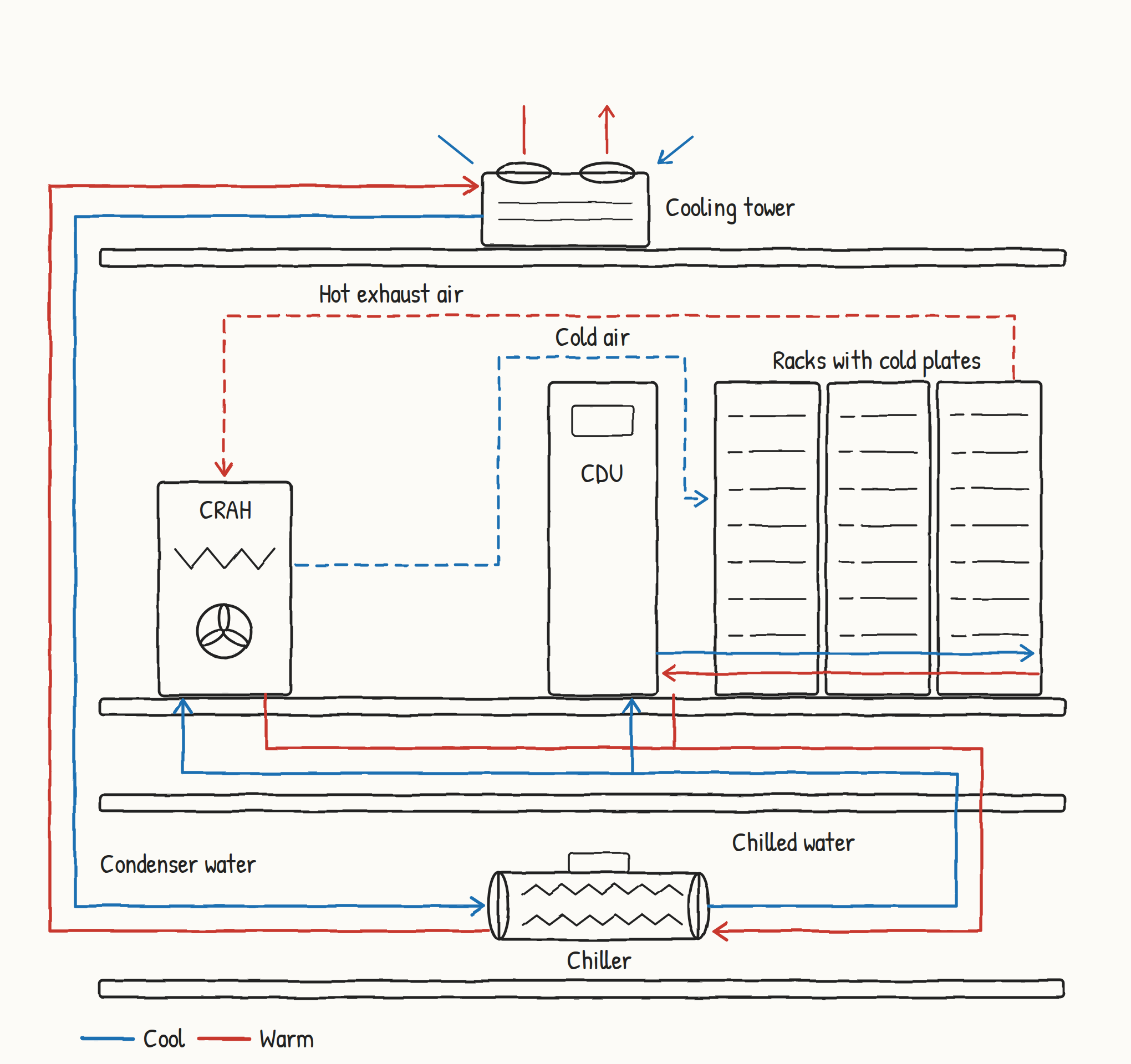
In a typical liquid-cooled facility, a CDU serves cold plates in the racks while a CRAH still handles the leftover heat that goes to air.
True liquid cooling comes in two main forms. As heat emitted by AI racks climb past what air can effectively cool, these systems carry heat away from the hottest components directly. In direct-to-chip cooling, cold plates sit on top of the processors, and a coolant loop carries the heat to a coolant distribution unit (CDU), which hands it off to the facility water system. In immersion cooling, servers are submerged in a non-conductive fluid. Single-phase systems keep the fluid liquid, while two-phase systems let it boil off the chips and condense it back for reuse. Liquid moves heat far more effectively than air, and opens the door to higher rack densities of GPUs.
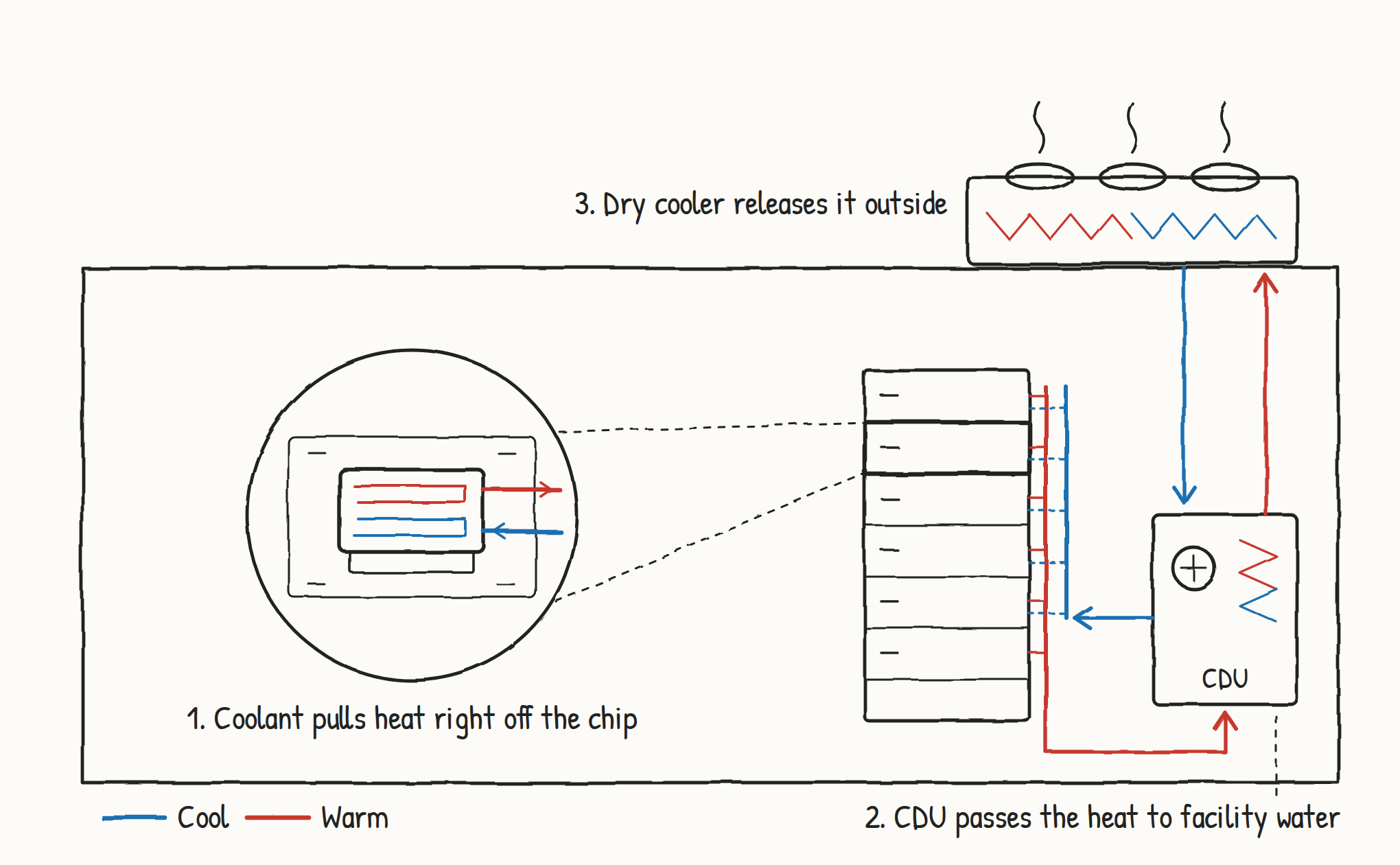
In direct-to-chip cooling, liquid removes heat right at the processor, which is what makes it true liquid cooling.
The Sustainability of Liquid Cooling
Liquid cooling has its own trade-offs. Two-phase immersion often relies on fluorinated fluids, including PFAS such as Chemours' proposed Opteon 2P50, which raise concerns about evaporative losses, manufacturing emissions, and end-of-life disposal. Single-phase systems use oils, glycols, or treated water, which carry their own leak, disposal, and handling issues. Liquid cooling also doesn't eliminate heat rejection: AI densities concentrate more heat into larger, hotter outdoor yards of dry coolers, chillers, or cooling towers, and if cooling towers are used, water consumption returns. Roughly 15 to 30% of the heat (memory, power supplies, networking) still goes to air, so facilities must run and optimize two cooling systems at once. Finally, CDUs, manifolds, cold plates, and piping add embodied material, leak risk near IT equipment, and complexity when converting existing halls.
How CFD Helps, and Where It Doesn't
CFD addresses the airflow and flow-distribution problems that cause much of the wasted energy and water:
Raising setpoints safely: Recirculation, bypass, and hot spots are the main reasons operators overcool data halls. Interior CFD identifies and fixes them through containment, tile layout, blanking, and return paths, so supply temperatures can rise within ASHRAE limits. That cuts compressor energy and extends economizer hours.
Right-sizing and part-load operation: CFD can show how many CRACs or CRAHs a room actually needs and how it behaves with units staged down or failed. That supports modular, variable-speed operation instead of running everything at full output.
Comparing air delivery strategies: CFD can compare underfloor, overhead, in-row, and fan wall air delivery for a specific room before anything is built. Each has strengths, but underfloor delivery in particular is prone to losing cold air before it reaches the servers. Cold air can leak through cable cutouts and gaps straight into the hot aisle, hot exhaust can loop back around to the front of the racks, and cables and pipes under the floor can block airflow, starving some racks while flooding others. Without containment, cold supply air and hot exhaust also mix freely in the open room. All of this forces the cooling units to work harder for the same result. The right design depends on the room, and CFD shows exactly where these losses occur and which layout avoids them.
Liquid cooling flow and heat transfer: CFD can model cold plates, manifolds, and immersion tanks to balance flow across racks and servers, minimize pressure drop and pump energy, and confirm chip temperatures at higher coolant supply temperatures. Higher supply temperatures are what unlock chiller-free operation. In immersion systems, CFD is also used to set server spacing so surface temperatures stay within limits.
Hybrid air/liquid rooms: A simple calculation can estimate how much air cooling capacity is needed for the leftover heat that liquid doesn't capture. What it can't show is where that heat ends up. Leftover heat often concentrates around specific racks, power equipment, or networking gear, and a room sized correctly on paper can still have hot spots. CFD shows how the air actually moves, so the air system can be placed and sized to handle the real distribution of heat without overbuilding it.
Exterior performance: Exterior CFD catches hot exhaust recirculating into condensers, chillers, dry coolers, or evaporative intakes, plus wind effects and plume interaction with neighbors. Recirculation raises entering air temperature, which costs compressor energy, reduces free-cooling hours, and increases evaporative water use. This matters even more as AI heat rejection yards grow larger and denser.
Failure and resilience: CFD transient models of cooling failures show how long equipment stays within limits under different setpoints, including pump or CDU failures in liquid systems with low thermal mass. That lets designers balance efficiency against reliability instead of overbuilding.
Design-stage comparisons: CFD can test economizer, hybrid, and liquid/air configurations virtually before committing capital.
The Bottom Line
CFD does not change a refrigerant's GWP, alter a coolant's chemistry, eliminate water treatment chemicals, or create water where it's scarce. Its contribution is indirect: it reduces how much energy and water a system needs to do its job, and it helps owners choose and size the right system for their climate and density.
There's no perfectly sustainable way to cool a data center. CRACs trade energy use and refrigerant emissions for reliability and simplicity. Direct evaporative cooling saves electricity but spends water, often in the places where water is scarcest. Liquid cooling handles AI-level heat far more efficiently, but it brings coolant chemistry concerns, larger heat rejection yards, and the complexity of running air and liquid systems side by side. As rack densities keep climbing, most facilities will rely on a mix of all three.
What every approach has in common is that its real-world performance depends on how air and liquid actually move through the room and around the site. Hot spots lead to overcooling, recirculation robs equipment of capacity, and uneven flow forces colder supply temperatures than the hardware needs. These are exactly the problems CFD is built to find. Most importantly, CFD helps prevent overheating. It shows where hot spots and recirculation could push equipment past safe temperatures, so they can be fixed before they cause throttled servers, equipment damage, or costly shutdowns. The same analysis makes sure each system uses as little energy and water as possible, and it lets owners test their options before committing capital. With hotter servers and tighter resources, simulation is one of the most practical tools a data center team has for staying both reliable and sustainable.