
Learn CFD Simulation Software & Get Started
Computational Fluid Dynamics (CFD) is a branch of fluid mechanics that uses numerical methods and algorithms to solve and analyze problems involving fluid flow and heat transfer. Getting started with CFD requires selecting appropriate simulation software, establishing a practical pre-to-post-processing workflow, and implementing quality assurance practices that ensure simulation results are reliable enough to support engineering decisions.
The following guide covers the three critical evaluation areas for engineers and organizations beginning their CFD journey: software capability, workflow efficiency, and result quality. These criteria apply regardless of whether you plan to build simulation capability in-house, co-source with external specialists, or outsource entirely.
1. How Do You Choose CFD Software?
Don’t waste time attempting to perform a simulation in a software package without the capability to perform the simulation in the first place. There is a hierarchy of software packages when it comes to being able to handle increasingly complex or specialized physics. If you have a basic physics problem, including laminar or turbulent single-phase flow of Newtonian liquids or ideal gases, you may only require a basic CFD software package, such as Autodesk CFD or Solidworks Flow Simulation. If your application involves more complex physics such as multiphase flows, dynamic fluid-body interactions, compressible flows, electrodynamics, and combustion, you’ll definitely want to be looking into a higher-end product such as STAR-CCM+ or ANSYS Fluent, or the range of software packages that fall somewhere in between. For a specialized application like external aerodynamics of on-road vehicles or open-surface flows, you’ll probably benefit from looking into software specifically formulated for users in those fields, as they may provide a more relevant bang-for-your-buck package without having to pay for capabilities you’ll never use. For a detailed CFD software comparison, see our blog post on that topic.
When I refer to capabilities, I’m not talking about a check mark on a product cut sheet. There is a major unheralded difference between theoretical capability and practical capability. Theoretical capability is a beta version of a new “feature” or a little used add-on. If your code has only theoretical capability, be ready for the frustration of results that don’t make sense and frequent software crashes. Practical capability on the other hand, comes with tools that have been put to the test and upgraded by developers ad nauseum to the point where they are almost unbreakable. To hone in on whether a potential software has practical capability in your problem area, ask for related validation case examples and existing customer references in a related field.
2. What Makes an Efficient CFD Workflow?
If you are like me, life is a continuous stream of looming deadlines for delivering results.
If you are like me, life is a continuous stream of looming deadlines for delivering results. And by results, I mean insights that add real value to your company’s products, not just pretty CFD pictures. Do you enjoy spending extra time at work on nights and weekends? Neither do I. That is why workflow and ease-of-use are near the top of this list. A smooth workflow makes it easy and efficient to move from idea to 3D concept to simulations and to presentation of results. Remember, your time is always worth more than you think it is, so don’t get scared off by a software’s sticker price if it means hundreds of hours of time saved each year.
Beware of the time required to jump between stand-alone software packages when moving from pre-processing to simulation to post-processing, even if some of those software are “free”. Really, these tasks aren’t divisible at all. An efficient workflow moves seamlessly between the three. A typical project for me looks like this:
Geometry->Mesh->Simulate->Revise mesh->Run->Look at results as the simulation progresses interactively->Stop, revise geometry->Continue simulation from last stop->Revise mesh->Look at something different in result->Revise geometry again->Realize you have modeled air and not water->Restart, etc.
With that you can begin to understand how having to move between three or more separate software packages is extremely wasteful. But trust me, it’s even worse than you are imagining right now.
3. How Do You Ensure CFD Simulation Quality?
Let’s face it, we are judged on the quality of our work whether in terms of ability to produce new and innovative designs that achieve unparalleled performance in record time, or whether in terms of our ability to influence others. Your software is your gateway to high quality. The old saying, “you are only as good as your tools” is nowhere more applicable than when talking about computational simulation. Look at the following CFD outputs communicating the air temperature profiles in a computer server room and ask yourself the following questions: Which is more likely to be a high-quality result in terms of its predictive capability and which is more likely to influence decision makers and reflect positively on your capabilities by its “polished” nature?
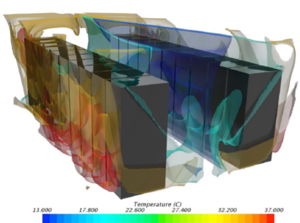
High quality CFD outputs communicating air temperature profiles in a computer server room have a great predictive capability.
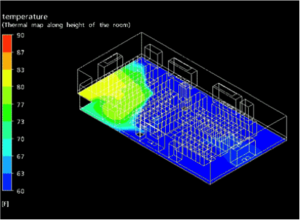
Low quality CFD outputs are less likely to influence decision makers and may reflect negatively on your capabilities.
The answer is obvious, right? Results like that on the left are possible with software products that have put in the time and effort to understand that presentation matters while products that produce like that on the right have not. Don’t forget to take this into account.
So, now that I’ve addressed the main concerns related to software capability, workflow, and quality, I want to point out that when choosing simulation software for your company, the decision cannot be made from a distance, nor can it be made solely by an “expert” such as myself without a full understanding of your specific application. There are no two ways about it, the best answer will become clear only after you have evaluated each of your potential software packages on an extended trial basis of at least 30 days of consistent use. If a software package vendor refuses to allow for such a trial, be wary of what they are trying to hide by doing so.
If it turns out to be more than you are ready to handle at the present moment, you can always turn to Resolved Analytics as a trusted simulation service provider by contacting us here.
4. How Long Does It Take to Learn CFD?
The learning curve for CFD depends on the software complexity and the analyst's engineering background:
Purpose-built tools (e.g., data center thermal modeling software, electronics cooling tools): An engineer with domain expertise can produce useful results within 1-2 weeks of training, because the software constrains the setup to known physics.
Commercial general-purpose platforms (e.g., Siemens STAR-CCM+, ANSYS Fluent): Proficiency in basic single-physics simulations typically takes 2-3 months of regular use. Competence in complex multiphysics problems, custom meshing strategies, and validation methodology may take 1-2 years.
Open-source frameworks (e.g., OpenFOAM): The steepest learning curve — typically 6-12 months to reach basic proficiency due to the command-line interface, lack of integrated pre/post-processing, and minimal documentation. Suited for organizations with strong Linux/scripting expertise and a willingness to invest in self-directed learning.
The fastest path for most engineering organizations is to pair structured software training with mentorship from an experienced CFD analyst — either in-house or through a co-sourcing arrangement.